index_fill
依据指定的轴/维度和索引将指定位置的张量填充为指定值。
本 API 支持两种调用方式:
Paddle 风格:
paddle.index_fill(x, index, axis, value, name=None)使用 Paddle 风格的参数顺序和命名。PyTorch 风格:
paddle.index_fill(input, dim, index, value)使用 PyTorch 风格的参数顺序和命名。
图解说明:
一个形状为 [3, 3] 的二维张量,通过 index_fill 操作,当 axis = 0,索引张量 index 为 [0, 2],填充值 value = -1 时,将第一行和第三行的所有元素填充为 -1,从而得到形状仍为 [3, 3] 但元素部分改变的新张量。
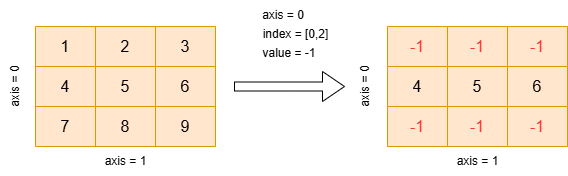
参数
x (Tensor) – 输入张量。
x的数据类型可以是float16、float32、float64、int32、int64。index (Tensor) – 包含索引下标的 1-D Tensor。数据类型可以是
int32、int64。axis (int) – 索引轴。数据类型为
int。value (float) – 用于填充目标张量的值。
name (str,可选) - 具体用法请参见 api_guide_Name,一般无需设置,默认值为
None。
返回
Tensor,返回一个数据类型同输入的 Tensor。
代码示例
>>> import paddle
>>> input_tensor = paddle.to_tensor([[1, 2, 3], [4, 5, 6], [7, 8, 9]], dtype='int64')
>>> index = paddle.to_tensor([0, 2], dtype="int32")
>>> value = -1
>>> res = paddle.index_fill(input_tensor, index, 0, value)
>>> print(input_tensor)
Tensor(shape=[3, 3], dtype=int64, place=Place(cpu), stop_gradient=True,
[[1, 2, 3],
 [4, 5, 6],
 [7, 8, 9]])
>>> print(res)
Tensor(shape=[3, 3], dtype=int64, place=Place(cpu), stop_gradient=True,
[[-1, -1, -1],
 [ 4,  5,  6],
 [-1, -1, -1]])