scatter
小心
本接口根据输入参数的不同,包含两种不同的功能。
下面列举的两种功能参数输入方式 互斥,混用非公共的参数输入方法将会导致报错,请谨慎使用。
通过基于 updates 来更新选定索引 index 上的输入来获得输出。具体行为如下:
如下图,当 overwrite 为 True 的时候使用覆盖模式更新相同索引的输出,依次将 x[index[i]] 更新为 update[i] ;而当 overwrite 为 False 时使用累加模式更新相同索引的输出,先依次将 x[index[i]] 更新为与该行大小相同的元素值均为 0 的 Tensor ,再依次将 update[i] 加到 x[index[i]] 产生输出。
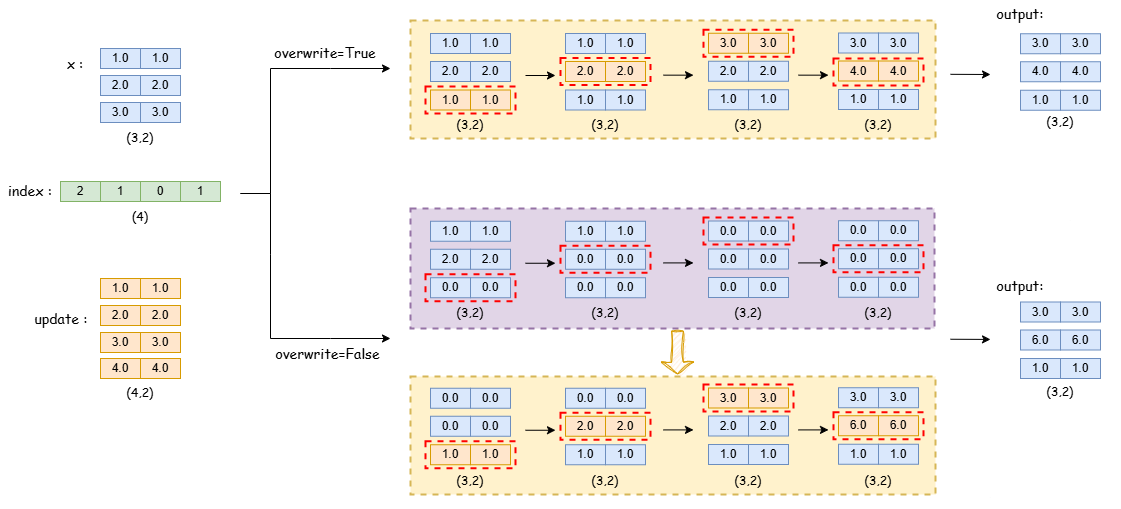
 >>> import paddle
 >>> # input:
 >>> x = paddle.to_tensor([[1, 1], [2, 2], [3, 3]], dtype='float32')
 >>> index = paddle.to_tensor([2, 1, 0, 1], dtype='int64')
 >>> # shape of updates should be the same as x
 >>> # shape of updates with dim > 1 should be the same as input
 >>> updates = paddle.to_tensor([[1, 1], [2, 2], [3, 3], [4, 4]], dtype='float32')
 >>> overwrite = False
 >>> # calculation:
 >>> if not overwrite:
 ...     for i in range(len(index)):
 ...         x[index[i]] = paddle.zeros([2])
 >>> for i in range(len(index)):
 ...     if overwrite:
 ...         x[index[i]] = updates[i]
 ...     else:
 ...         x[index[i]] += updates[i]
 >>> # output:
 >>> out = paddle.to_tensor([[3, 3], [6, 6], [1, 1]])
 >>> print(out.shape)
 paddle.Size([3, 2])
Notice: 因为 updates 的应用顺序是不确定的,因此,如果索引 index 包含重复项,则输出将具有不确定性。
参数
x (Tensor) -
ndim>= 1的输入 N-D Tensor。数据类型可以是 float32,float64。index (Tensor)- 一维或者零维 Tensor。数据类型可以是 int32,int64。
index的长度不能超过updates的长度,并且index中的值不能超过输入的长度。updates (Tensor)- 根据
index使用update参数更新输入x。当index为一维 tensor 时,updates形状应与输入x相同,并且dim>1的 dim 值应与输入x相同。当index为零维 tensor 时,updates应该是一个(N-1)-D的 Tensor,并且updates的第 i 个维度应该与x的i+1个维度相同。overwrite (bool,可选)- 指定索引
index相同时,更新输出的方式。如果为 True,则使用覆盖模式更新相同索引的输出,如果为 False,则使用累加模式更新相同索引的输出。默认值为 True。name (str,可选) - 具体用法请参见 api_guide_Name,一般无需设置,默认值为 None。
返回
Tensor,与 x 有相同形状和数据类型。
代码示例
 >>> import paddle

 >>> x = paddle.to_tensor([[1, 1], [2, 2], [3, 3]], dtype='float32')
 >>> index = paddle.to_tensor([2, 1, 0, 1], dtype='int64')
 >>> updates = paddle.to_tensor([[1, 1], [2, 2], [3, 3], [4, 4]], dtype='float32')

 >>> output1 = paddle.scatter(x, index, updates, overwrite=False)
 >>> print(output1)
 Tensor(shape=[3, 2], dtype=float32, place=Place(cpu), stop_gradient=True,
 [[3., 3.],
  [6., 6.],
  [1., 1.]])

 >>> output2 = paddle.scatter(x, index, updates, overwrite=True)
 >>> # CPU device:
 >>> # [[3., 3.],
 >>> #  [4., 4.],
 >>> #  [1., 1.]]
 >>> # GPU device maybe have two results because of the repeated numbers in index
 >>> # result 1:
 >>> # [[3., 3.],
 >>> #  [4., 4.],
 >>> #  [1., 1.]]
 >>> # result 2:
 >>> # [[3., 3.],
 >>> #  [2., 2.],
 >>> #  [1., 1.]]
PyTorch 兼容的 scatter 函数。基于 put_along_axis 实现,等效于 paddle.put_along_axis(..., broadcast=False)。详细的用法见 put_along_axis。
参数
input (Tensor) - 输入 N-D Tensor。数据类型可以是 float32,float64,float16,bfloat16,int32,int64,int16,uint8。
dim (int) - 进行 scatter 操作的维度,范围为
[-input.ndim, input.ndim)。index (Tensor)- 索引矩阵,包含沿轴提取 1d 切片的下标,必须和 arr 矩阵有相同的维度。注意,除了
dim维度外,index张量的各维度大小应该小于等于input以及src张量。内部的值应该在input.shape[dim]范围内。数据类型可以是 int32,int64。src (Tensor)- 需要插入的值。
src是张量时,各维度大小需要至少大于等于index各维度。不受到input的各维度约束。当为标量值时,会自动广播大小到index。数据类型为:bfloat16、float16、float32、float64、int32、int64、uint8、int16。本参数有一个互斥的别名value。reduce (str,可选)- 指定 scatter 的归约方式。默认值为 None,等效为
assign。可选为add、multiple、mean、amin、amax。不同的规约操作插入值 src 对于输入矩阵 arr 会有不同的行为,如为assign则覆盖输入矩阵,add则累加至输入矩阵,mean则计算累计平均值至输入矩阵,multiple则累乘至输入矩阵,amin则计算累计最小值至输入矩阵,amax则计算累计最大值至输入矩阵。out (Tensor,可选) - 用于引用式传入输出值,注意:动态图下 out 可以是任意 Tensor,默认值为 None。
返回
Tensor,与 input 有相同形状和数据类型。
代码示例
见 put_along_axis 的代码示例。